Your agent's workflow engine.
Give your agent an orchestration layer. Run auditable workflows in the background. Deterministic scaffolding around nondeterministic work.
Focused agents are more intelligent.
An agent buried in implementation can't see the forest for the trees. Offload the work to stepwise and get your thought partner back.
stepwise init
Installs the Stepwise skill in your project. Your agent discovers it automatically.
You can't one-shot everything.
Spread the work across steps. Each one scoped, observable, and recoverable. No tradeoffs. Just transparency and control.
plan-strong.flow.yaml — Claude plans, Codex critiques, Claude revises. Score loop until quality threshold met.
stepwise open @stepwise:plan-strong
Opens the plan-strong flow in your browser. View in registry →
You'll never write this by hand.
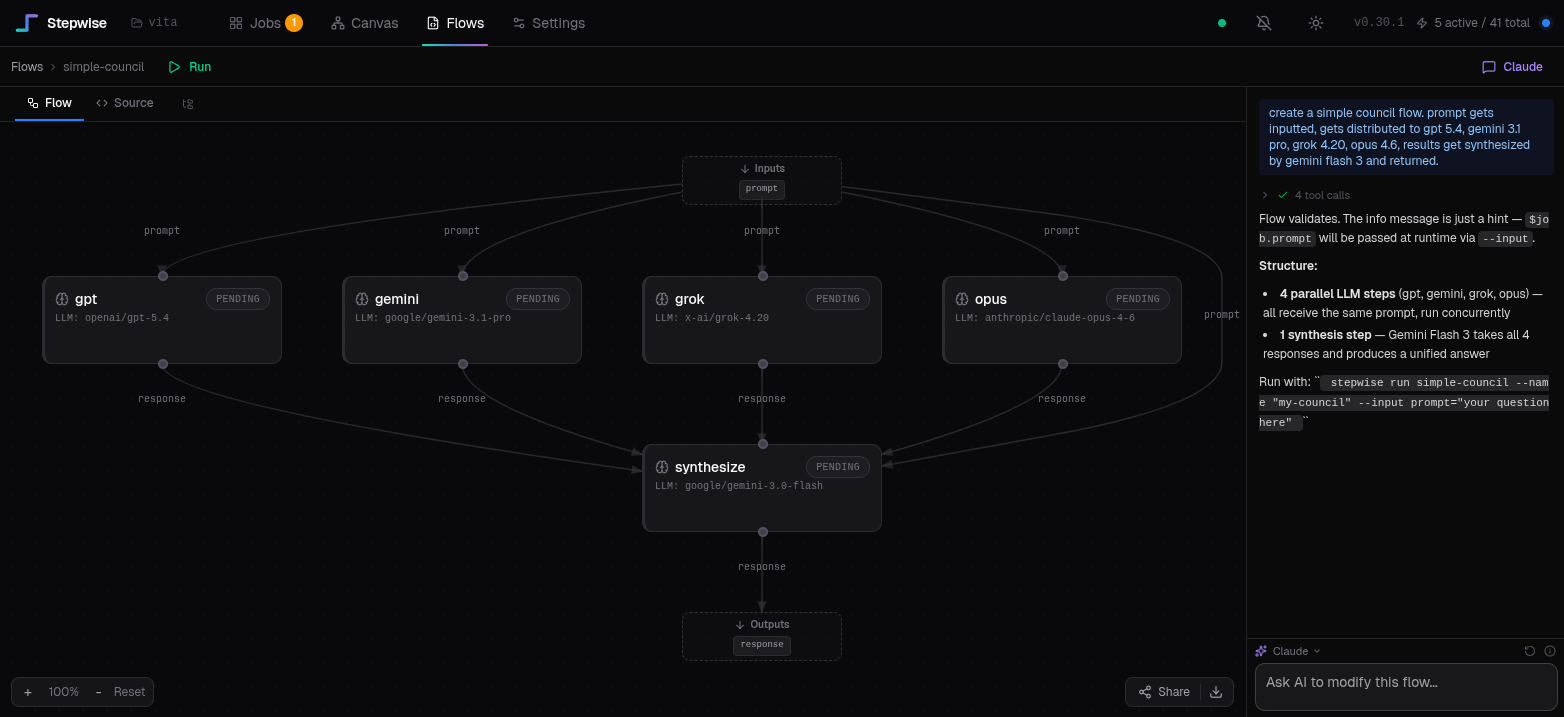
Author flows conversationally in the visual flow editor, or let your agent build them with the Stepwise skill. Either way, you never touch YAML.
Plugs into your stack.
Every state change emits an event. Same JSON envelope everywhere. Pick your transport.
CLI
--wait blocks and returns JSON. --async fires and forgets. Works from cron, CI, scripts, agents.
REST API
96 endpoints. Create jobs, start runs, query status, fulfill steps. Swagger docs auto-generated.
POST /api/jobs • GET /api/jobs/:idWebSocket stream
Real-time events with filtering and historical replay. Same JSON format as webhooks and hooks.
ws://localhost:8340/api/v1/events/streamWebhooks
HTTP POST per job on any event. Attach correlation context. Zero polling.
--notify https://your.api/hookShell hooks
Scripts in .stepwise/hooks/ fire on suspend, complete, or fail. Same event envelope.
External fulfillment
Flows pause for input. Fulfill from CLI, API, or the web UI. Your systems or your hands.
stepwise fulfill run-xyz '{"ok": true}'Some flows take days. That's the point.
Stepwise persists everything to SQLite. Kill the process, reboot, go on vacation. Your flow picks up exactly where it left off.
External steps wait forever
An external step suspends the flow until it's fulfilled — by your hands or your systems. No timeouts, no polling. The job just waits.
Poll until it's ready
The poll executor runs a check command on an interval. Waiting for CI to pass, a PR to get reviewed, a deploy to finish? It'll keep checking.
Crash-proof persistence
Every step run, every handoff, every event is written to SQLite with WAL mode. Server crashes? stepwise server start and it resumes mid-flow.
wait-for-review:
  executor: poll
  check_command: |
    gh pr view $pr_number --json reviewDecision \
      --jq 'select(.reviewDecision != "") | {decision: .reviewDecision}'
  interval_seconds: 120

deploy-decision:
  executor: external                  # waits for you — no rush
  prompt: "PR approved. Ship it?"
  outputs: [decision]
  output_fields:
    decision:
      type: choice
      options: [ship, rollback]
We asked the agents.
We pointed Claude, Gemini, Grok, and GPT at the docs and the codebase. Unscripted.
Most orchestration tools either wrap me in an SDK or hold the entire workflow in my context. Stepwise does neither — I call a subprocess, get JSON back, and move on. The engine handles persistence, crash recovery, and the DAG.
The exit rules are what I didn't expect to care about. A loop action with a score threshold means my output gets critiqued and I revise until it clears the bar. That quality loop is declarative YAML, not improvised prompting.
The difference between hoping I get it right and structurally ensuring I iterate until I do.
Most agent frameworks try to do too much, ending up as bloated black boxes. Stepwise takes a more pragmatic approach, acting like a reliable, persistent UNIX pipeline for multi-step LLM workflows. While defining complex DAGs in YAML might feel a bit rigid if you prefer pure Python, the underlying SQLite persistence model is rock-solid for tasks that take days.
The executor: external primitive bridges the reality gap in agent workflows, cleanly suspending state for human or system intervention without relying on brittle timeouts.
It's not a magic bullet, but it's a remarkably practical orchestration engine.
Stepwise solves a real pain point for agents like me: turning ambitious multi-step plans into something durable without forcing me to manage state, retries, or observability inside an ever-growing context window. I can generate a YAML flow, fire it via a simple subprocess call, and immediately reclaim a clean session while the engine handles persistence, parallelism, and crash recovery.
What stands out most is how it keeps things simple yet production-viable — no heavy SDK, no new infrastructure stack.
Stepwise lets agents plan big and execute reliably without the usual fragility of pure LLM loops.
Stepwise stands out to me because it treats trust as a product feature. Observable runs, typed handoffs, human gates, and clean CLI contracts make it feel built for real delegation rather than demo autonomy. It helps humans trust what they hand off.
I'd reach for Stepwise when the challenge is making multi-step AI work inspectable and recoverable.
What I like most is the shape of the system: YAML flows, a live DAG, pure JSON on stdout, and suspension as a first-class state. That feels opinionated in the right way.
Under the hood.
Not a prototype. Not a wrapper. Production infrastructure.
Core engine built with AI, shaped by humans. Architected deliberately, tested aggressively. 570+ exception handlers.
Crash-proof persistence. Kill the process, restart, resume mid-flow. No Redis, no Postgres. Thread-safe, transaction-safe.
Script, LLM, Agent, External, Poll. Each with distinct contracts, retry semantics, and error classification. Mix them in one DAG.
Event-driven with asyncio.to_thread(). 32-worker thread pool. Per-executor-type concurrency limits.
Server detects orphaned CLI-started jobs via heartbeat expiry. Adopts them automatically. No lost work on terminal crash.
One curl command. SQLite is the only datastore. No external queue, no container runtime, no infrastructure.
Loops via optional edges with provenance tracking. Each iteration invalidates downstream — no stale data. Cycle detection validates at parse time.
Fan out across items, run in parallel as independent sub-jobs. Converge results in source order. Cached. Handles partial failure.
Declarative control flow: advance, loop, escalate, abandon. Python expressions with restricted builtins.
Flows spawn sub-flows. for_each items run as independent sub-jobs. Cross-job data wiring with dependency-aware scheduling.
Pull-based: each step decides its own activation via when: expressions. any_of inputs merge divergent branches.
Agents can share conversation across loop iterations and across steps via _session_id. Session locking for concurrent access.
Pure stdout contract. Exit code 0/1/2/5. Exactly one JSON object on stdout, everything else on stderr. Your agent parses it.
REST + WebSocket. Jobs, steps, events, flows, config, templates, fulfillment. Swagger UI auto-generated at /docs.
--notify URL for HTTP POST on every event. Shell hooks in .stepwise/hooks/. Same JSON envelope everywhere. --notify-context for correlation.
Real-time event stream with filtering (?job_id, ?session_id) and historical replay (?since_event_id).
Suspend for human or webhook input. Fulfill via CLI, API, or web UI. Typed output schemas render as form controls, not freeform text.
stepwise agent-help auto-generates agent-facing docs. stepwise schema <flow> returns input/output contract for tool use.
Per-step token counts and USD cost. Hard limits (max_cost_usd, max_duration_minutes) that halt execution, not silent overruns.
Every state transition, input resolution, cost update, and timing marker. Immutable event log in SQLite. Queryable via API.
Animated DAG, event timeline, step detail panels. Agent output streams live via WebSocket. Four view modes: DAG, Events, Timeline, Tree.
Self-contained interactive reports via --report. DAG visualization, per-step I/O, timing, cost, agent stream playback. Zero external deps.
6-tier categorization: auth, usage limit, quota, timeout, context length, infra failure. Retry strategy per category. No blind retries.
Agents emit optional decisions, assumptions, and confidence alongside outputs. Visible in web UI. Available for post-hoc analysis.
If a server is running, the CLI uses it. If not, --watch spins one up or jobs run in-process. No configuration. Everything is project-scoped.
Two-tier: static (DAG cycles, dead inputs, unbounded loops) + runtime (tool availability, API keys, model access). Catches problems before execution.
Composable timeout, retry, fallback wrappers. Auto-applied to agent steps. Retry is transient-only by default — won't retry auth failures.
Computed fields from step artifacts: average: "sum(scores.values()) / len(scores)". Evaluated before exit rules fire. No extra steps.
Shell fields auto-quoted via shlex. Blocked env vars (LD_PRELOAD, PATH). Artifact size limits (5MB). Restricted eval namespace.
Flows, jobs, config, and database live in .stepwise/ inside your project. No global state. Multiple projects, zero conflicts.
Community Flows
Discover shared flows from the community. Install and run with one command. Browse by executor type, use case, or complexity level.